 DevHeader
Guides · Mocks
How to simulate a 500 error in Chrome
By Marlon Maniti · Last updated
Short answer: make the request return a fake response in the browser. A
DevHeader mock rule matches the endpoint's URL and answers with status 500,
the body, and the headers you choose, so the server is never touched. Chrome
DevTools can't change a status code on its own.
When you need this
Your UI has an error state for when the API fails, but the API almost never
fails on your machine. Stopping the backend gives you a network error, not a
500, and those are handled by different code: fetch() resolves for a
500 (with response.ok === false) but rejects for a network failure.
Without an extension
- Change the server. Add a temporary route or flag that throws. This is the most realistic option, and the slowest, and you can't do it against an API you don't own.
- Chrome DevTools Local Overrides. In the Network panel, right-click the
request and choose Override content or Override headers. You can
change the body and response headers, but the Overrides docs offer no way
to change the status code, so the page still sees a
200. - Chrome DevTools request blocking. Right-click a request and choose
Block request URL. The page gets a network error, which is useful to
test, but it is not a
500.
With DevHeader
Install DevHeader and turn on Allow User Scripts on its details page in
chrome://extensions(Chrome 138 or newer). Open the popup once and click Allow access.Open DevTools and switch to the DevHeader panel.
Reload the page. In Live Status, select the request you want to fail and click Add to Mocks. (Or click New Mock in Mock Management and type the URL path, such as
/api/orders.)In the rule's detail pane, open Response and set Status Code to
500. Replace the body with what your server returns on errors, for example:{ "error": "Internal Server Error" }Under Headers, keep
Content-Type: application/jsonand add any header your client reads, such asX-Request-Id.Click Save, enable the rule, and reload the page.
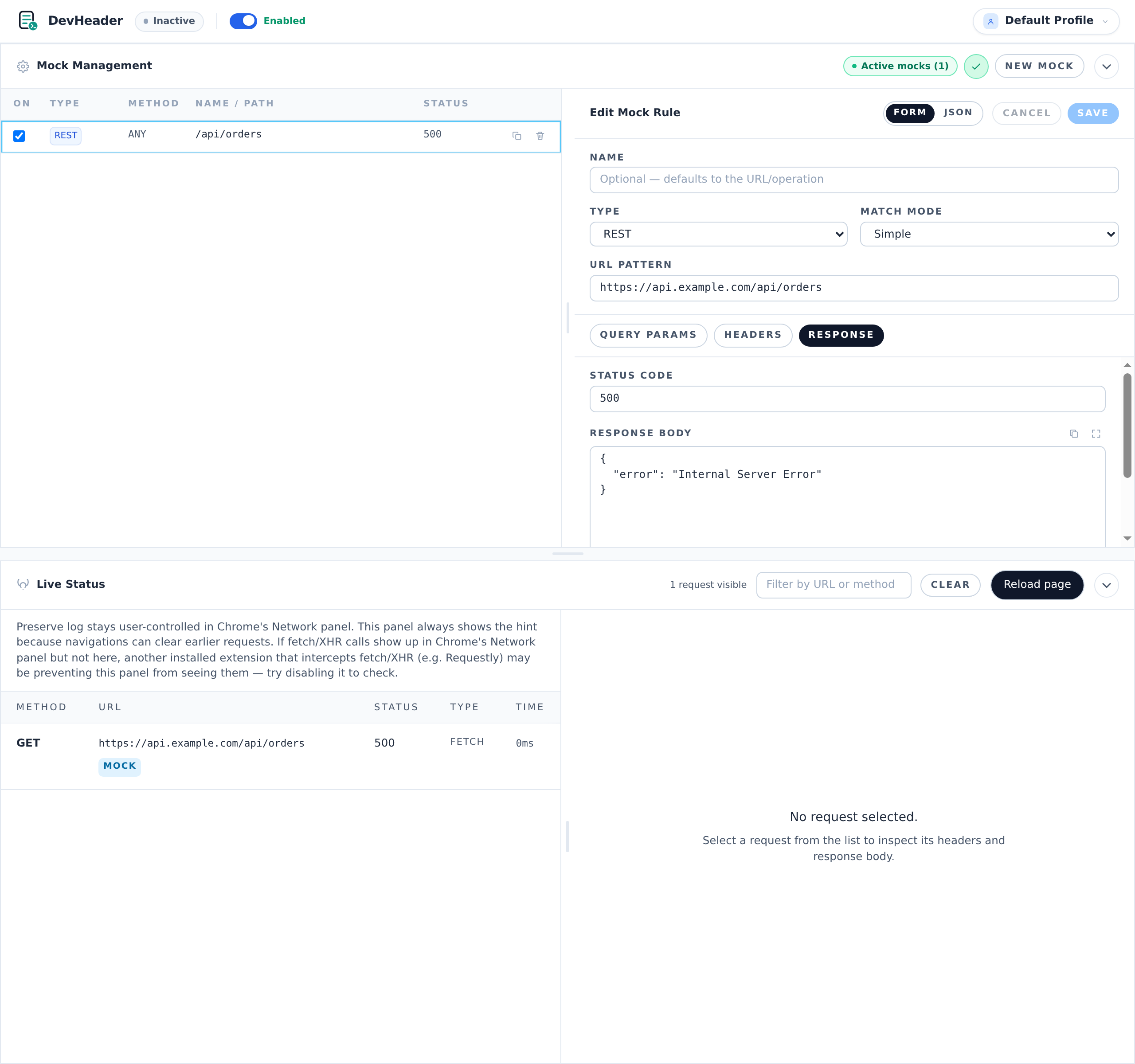
Check that it worked
The request shows 500 in Chrome's Network panel, and your code sees it:
const res = await fetch("/api/orders");
console.log(res.status, res.ok); // 500 false
The status badge in the DevHeader popup's Mocks tab should read Active mocks (1). If it doesn't, the badge says what's missing.
Turn the rule off in the popup when you're done. It stays saved for next time.
Limitations
- Mocks return immediately. DevHeader can't add delay, so it can't simulate a slow server or a timeout.
- Mocks cover
fetchandXMLHttpRequest, not page navigations, images, or WebSockets. - Mocks need Chrome 138+ with Allow User Scripts on.
FAQ
Can I return 502, 503, or 429 instead? Yes. Any status code works. For a
429, add a Retry-After header so your retry logic has something to read.
Will other requests still hit the server? Yes. Only requests matching the
rule's URL are mocked. Add query params to the rule to narrow it further,
for example only ?page=2.
Does this work for GraphQL? Yes, see
mocking one GraphQL query. GraphQL
servers usually return errors with status 200 and an errors array, so
mock that shape.
Sources
Try DevHeader
DevHeader is free, keeps every rule on your machine, and only touches sites you grant it access to. Install it from the Chrome Web Store or Edge Add-ons.