 DevHeader
Guides · Mocks
How to test what happens when a token expires (401)
By Marlon Maniti · Last updated
Short answer: make one API call return 401 Unauthorized in the browser,
then watch what your app does. A DevHeader mock rule on that endpoint with
status 401 lets you test logout, token refresh, and "session expired"
screens without waiting for a real token to expire.
What you're testing
When an access token expires, most apps should do one of these:
- refresh the token and retry the request once,
- send the user to the login page and keep where they were going, or
- show a "session expired" message.
The bugs are usually in the edges: refresh loops, several requests all refreshing at once, or an error toast plus a redirect.
Without an extension
- Shorten the token lifetime on a dev auth server, then wait. Realistic, slow, and you can't control which request fails first.
- Delete or edit the token in DevTools → Application (cookies or local storage). Good for testing "not logged in", but it fails every request at once.
- Chrome DevTools Local Overrides can change the body and headers of a response but not its status code.
With DevHeader
Install DevHeader and turn on Allow User Scripts on its details page in
chrome://extensions(Chrome 138+). Open the popup once and click Allow access.Open DevTools → DevHeader panel → Mock Management → New Mock.
Set URL Pattern to the endpoint that should fail, for example
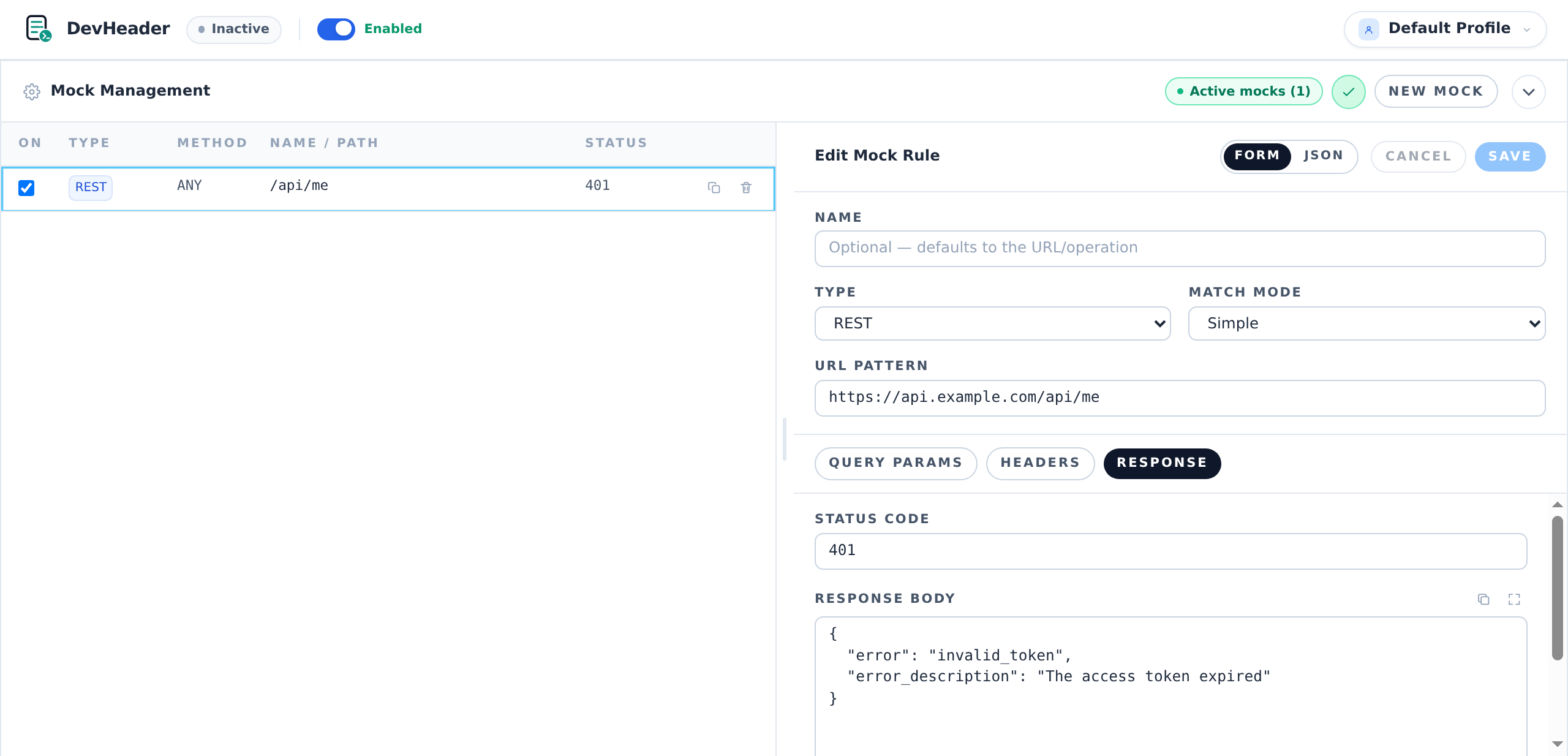
/api/me. Simple mode matches any URL containing that text.Under Response, set Status Code to
401and the body to your API's error, for example:{ "error": "invalid_token", "error_description": "The access token expired" }Under Headers, add what your server sends with a 401, typically
Content-Type: application/jsonandWWW-Authenticate: Bearer error="invalid_token".Click Save, enable the rule, and reload.
To test refresh-then-retry, also mock your refresh endpoint with a 200 and
a new token, or with a 401 to test a refresh that fails.
Check that it worked
fetch("/api/me") resolves with status === 401, the response headers you
set are readable, and the request has a MOCK badge in Live Status.
Because the mock answers every matching request, a client that retries
after refreshing will get the 401 again. That is a good way to check your
app stops after one retry instead of looping. Turn the rule off to let the
retry succeed.
Limitations
- DevHeader can't fail only the first call and pass the second. Use separate rules and toggle them, or point the retry at a URL the rule doesn't match.
- Mocks don't change cookies in the browser's cookie store.
- Mocks need Chrome 138+ with Allow User Scripts on.
FAQ
401 or 403? 401 means "not authenticated" (log in again). 403 means
"authenticated, but not allowed". Test both if your app treats them
differently.
Can I send the token instead of breaking it? Yes, with a header rule. See adding an Authorization header.
Sources
Try DevHeader
DevHeader is free, keeps every rule on your machine, and only touches sites you grant it access to. Install it from the Chrome Web Store or Edge Add-ons.