 DevHeader
Guides · Headers
How to add an Authorization header to every request in Chrome
By Marlon Maniti · Last updated
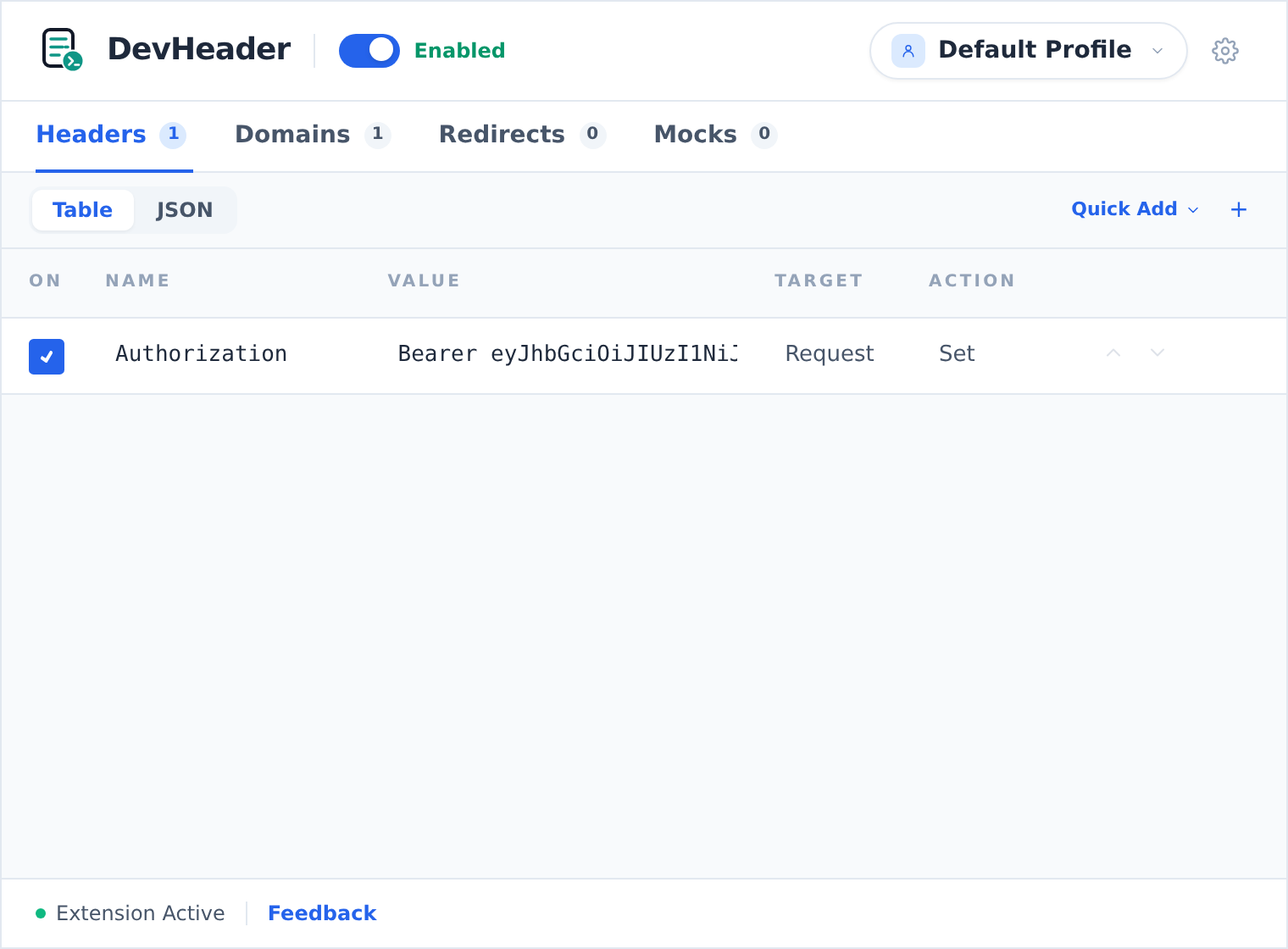
Short answer: add a request header rule. In DevHeader, create a header
named Authorization with the value Bearer <your token>, Target
Request, Action Set, and scope it to the API's domain. Chrome then
sends it on every matching request, page loads and fetch calls alike, and
replaces any Authorization header the page sends itself.
When you need this
- Calling a protected staging API straight from the address bar.
- Testing as another user or role without logging out.
- Reaching an internal service that sits behind a token-checking proxy.
Without an extension
curl is the simplest way to check one endpoint:
curl -H "Authorization: Bearer $TOKEN" https://api.staging.example.com/meChange the app to read the token from an environment variable. Fine for your own app; not possible for someone else's.
Chrome DevTools can't add request headers. Local Overrides change response headers only. Chrome's command-line flags don't add custom headers either.
With DevHeader
- Install DevHeader, open the popup, and click Allow access once.
- On the Domains tab, add the API's domain, for example
api.staging.example.com/*, and click Save Changes. Don't skip this: with an empty Domains list the header goes to every site. - On the Headers tab, click + and enter:
- Name:
Authorization(it autocompletes) - Value:
Bearer eyJhbGciOi... - Target: Request
- Action: Set
- Name:
- Click Save Changes. The rule is live right away; no reload of the extension needed.
To send it only on API calls, open the rule's filters and pick the
xmlhttprequest resource type, so page loads, images, and scripts are left
alone.
Check that it worked
Open Chrome's Network panel, select a request to that domain, and look under
Request Headers, or call an endpoint that echoes headers. DevHeader's
tests check this against a real server: both the page navigation and a
fetch() that set its own Authorization: Bearer page-token arrive with
the token from the rule.
Use the rule's On checkbox to switch it off without losing the token, or keep one profile per environment and switch profiles from the popup header.
Keep tokens safe
- DevHeader stores rules in
chrome.storage.localon your machine and makes no network calls of its own. Even so, use short-lived dev tokens. - Profile exports are plain JSON and include header values. Remove tokens before sharing an export.
Limitations
- Set replaces the page's own header. Use Append only for headers
that take lists;
Authorizationdoesn't. - Header rules don't change cookies stored in the browser or request bodies.
FAQ
Can I use different tokens for different sites? Yes, use a profile per environment. Each has its own domains and header rules.
Sources
Try DevHeader
DevHeader is free, keeps every rule on your machine, and only touches sites you grant it access to. Install it from the Chrome Web Store or Edge Add-ons.