 DevHeader
Guides · Headers
How to test a Content-Security-Policy change without deploying
By Marlon Maniti · Last updated
Short answer: override the page's Content-Security-Policy response
header in your own browser, then load the real site and watch the console.
With DevHeader, add a response header rule named Content-Security-Policy
with Action Set and your new policy; Quick Add → New CSP Header helps
you build it one directive at a time.
Why test before deploying
A stricter CSP can silently break a third-party script, an inline event handler, or an analytics beacon. A looser one might not fix the violation you were chasing. Either way you find out in production unless you try it first.
Option 1: Report-Only on the server
Send the new policy as Content-Security-Policy-Report-Only. Browsers report
violations in the console (and to a report-to endpoint) without blocking
anything. This is the right way to roll a policy out to real users, but it
still needs a deploy, and it shows what would break rather than letting you
click through the broken site.
Option 2: Chrome DevTools Local Overrides
Right-click the document request in the Network panel, choose Override
headers, and edit Content-Security-Policy. This works well for one
session; the override lives in your Overrides folder and only applies while
DevTools is open.
Option 3: DevHeader
Install DevHeader, open the popup, and click Allow access once.
On the Domains tab, add your site, for example
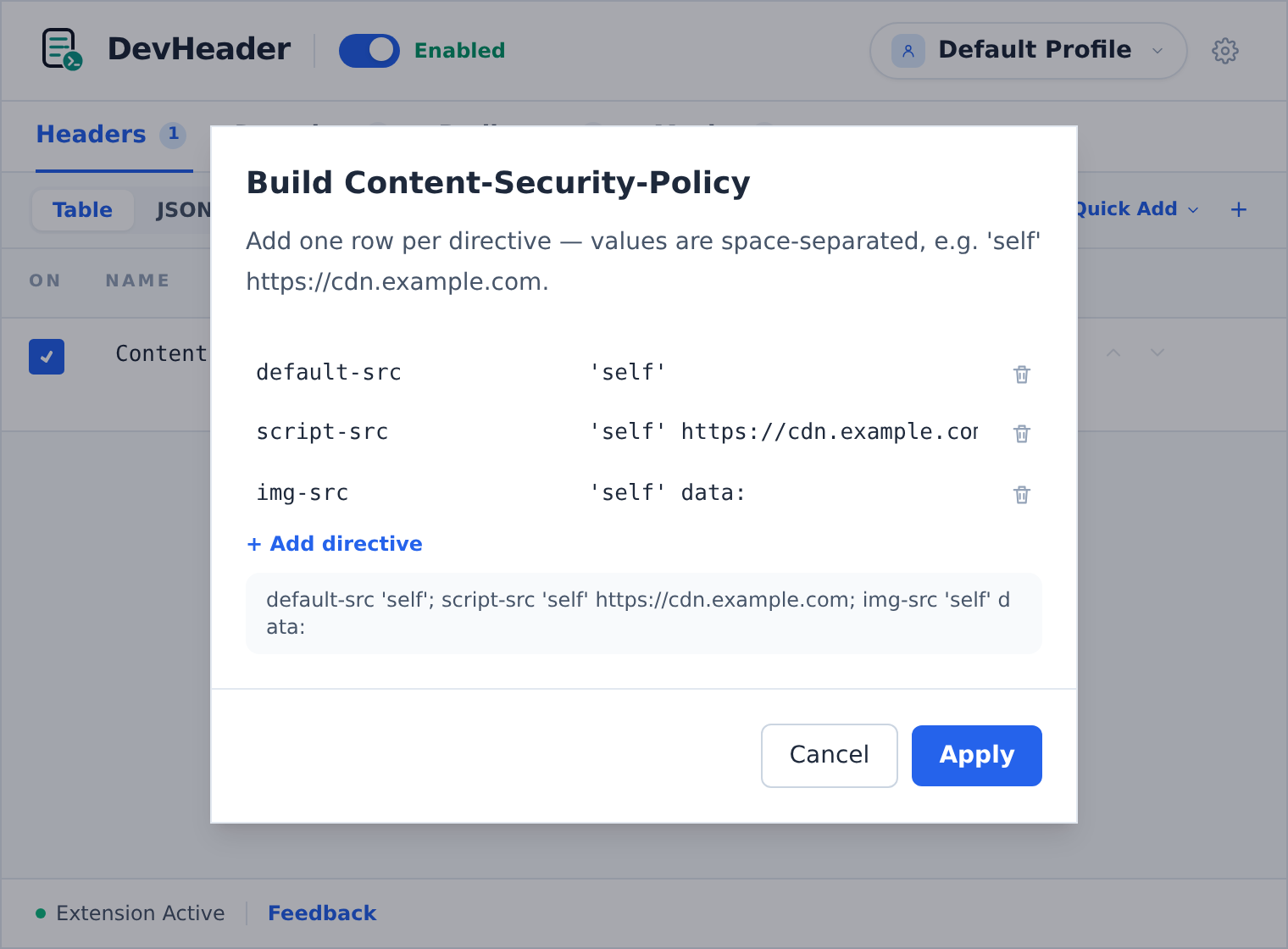
www.example.com/*, and save.On the Headers tab, open Quick Add → New CSP Header. Add one row per directive, for example:
Directive Values default-src'self'script-src'self' https://cdn.example.comimg-src'self' data:Click Save. The builder writes the header value for you:
default-src 'self'; script-src 'self' https://cdn.example.com; img-src 'self' data:. The row's Build… link reopens it later.Check the row's Target is Response and Action is Set, then click Save Changes and reload the site.
Set replaces whatever policy the server sent, so the browser enforces
exactly yours. DevHeader's tests check this in real Chrome: a page served
with script-src 'none' runs its inline script once a rule sets
script-src 'self' 'unsafe-inline'.
To trial a policy without blocking anything, name the header
Content-Security-Policy-Report-Only instead.
Read the results
Open the Console. Each blocked resource logs a message naming the directive,
such as Refused to load the script ... because it violates the following Content Security Policy directive: "script-src 'self'". Add the sources you
trust, save, reload, and repeat until the console is clean. Then copy the
final value into your server config.
Limitations
- A policy in a
<meta http-equiv="Content-Security-Policy">tag isn't a header, so a header rule can't remove it. Browsers enforce both. - Remove on
Content-Security-Policydrops the header policy entirely, which is useful to confirm CSP is the cause, not to test a new policy. - This changes only your browser; it's a test, not a fix.
FAQ
Can I test Permissions-Policy the same way? Yes, with Quick Add → New
Permissions-Policy Header, for example camera=().
Does it apply to iframes? A rule applies to any matching response, including frames, as long as the frame's domain is in your Domains list.
Sources
Try DevHeader
DevHeader is free, keeps every rule on your machine, and only touches sites you grant it access to. Install it from the Chrome Web Store or Edge Add-ons.