 DevHeader
Guides · Headers
"Blocked by CORS policy" while testing: how to unblock it in Chrome
By Marlon Maniti · Last updated
Short answer: the error means the server's response didn't include an
Access-Control-Allow-Origin header that allows your page's origin, so
Chrome hid the response from your code. The real fix is on the server. To
keep working until then, add the header in the browser: DevHeader's Quick
Add → CORS: Allow All inserts the four usual CORS response headers for the
API's domain.
The full error looks like this:
Access to fetch at 'http://localhost:4000/users' from origin
'http://localhost:3000' has been blocked by CORS policy: No
'Access-Control-Allow-Origin' header is present on the requested resource.
Why it happens
A page on http://localhost:3000 and an API on http://localhost:4000 are
different origins, because the port differs. Chrome still sends the request,
but only lets your JavaScript read the response if the server opts in with
CORS headers. For requests with a method other than GET/HEAD/POST, or with
headers like Content-Type: application/json, Chrome first sends an
OPTIONS preflight, which must also succeed.
Fix it on the server (do this eventually)
Allow your frontend's origin explicitly. For example, in Express:
import cors from "cors";
app.use(cors({ origin: "http://localhost:3000", credentials: true }));
Or put both behind one origin with your dev server's proxy (Vite
server.proxy, Next.js rewrites), so the browser never makes a
cross-origin request at all.
Unblock it in the browser while you test
Chrome DevTools: right-click the failed request in the Network panel,
choose Override headers, and add Access-Control-Allow-Origin. You need
DevTools open, and Local Overrides set up with a folder.
DevHeader:
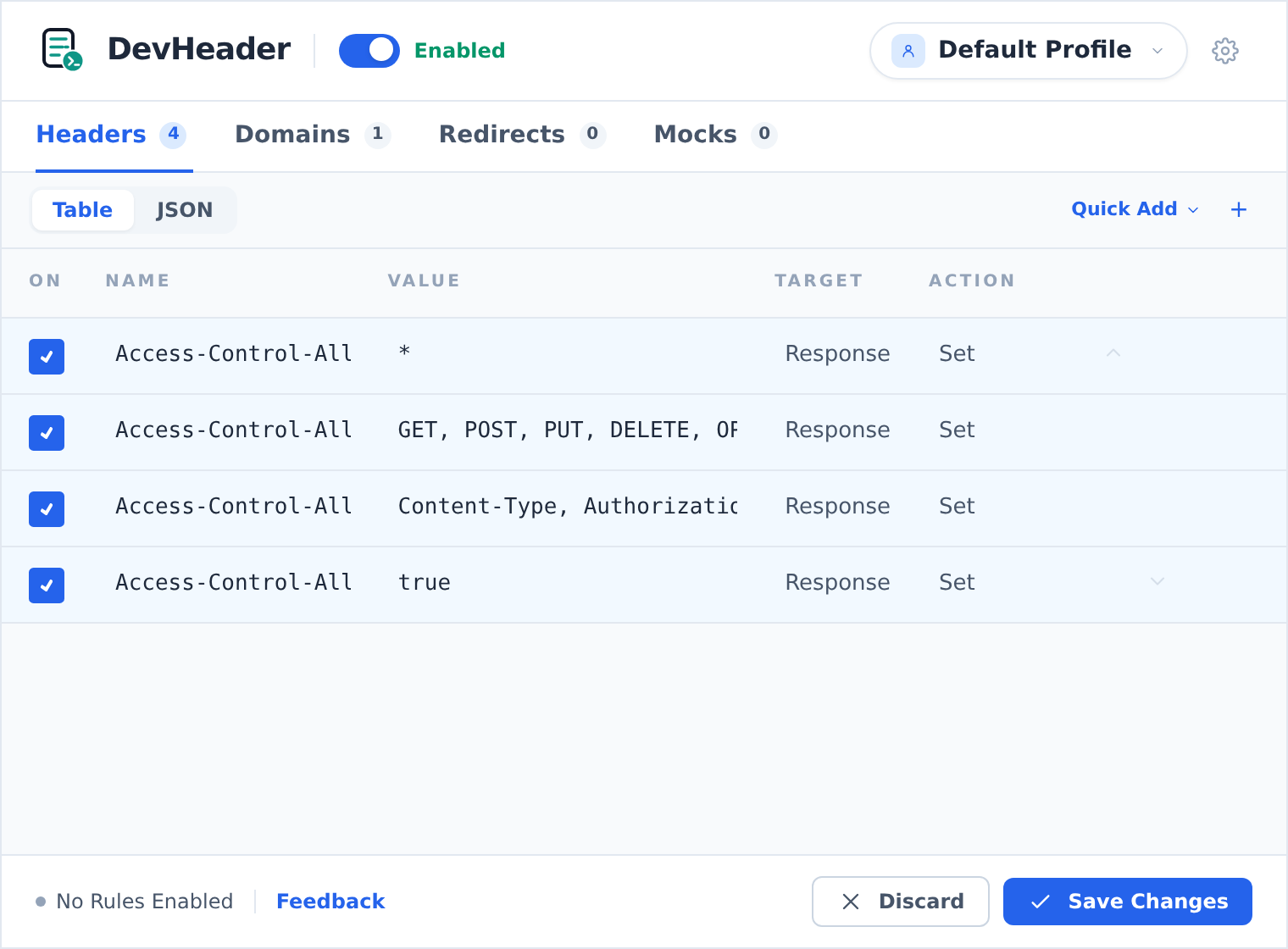
Install DevHeader, open the popup, and click Allow access once.
On the Domains tab, add the API's domain (not your page's), for example
http://localhost:4000/*, and save.On the Headers tab, open Quick Add → CORS: Allow All. It adds four response headers:
Header Value Access-Control-Allow-Origin*Access-Control-Allow-MethodsGET, POST, PUT, DELETE, OPTIONSAccess-Control-Allow-HeadersContent-Type, AuthorizationAccess-Control-Allow-CredentialstrueClick Save Changes and retry the request.
What this fixes, and what it doesn't
DevHeader's tests check each case in real Chrome, with a page and an API on different origins:
| Request | Without DevHeader | With CORS: Allow All |
|---|---|---|
Simple GET |
Blocked | Works |
PUT with JSON (preflighted), server answers OPTIONS with 2xx |
Blocked | Works |
PUT with JSON, server answers OPTIONS with 404 |
Blocked | Still blocked |
fetch(url, { credentials: "include" }) |
Blocked | Still blocked |
- Preflight returns an error status. A header rule can't change a status
code, and Chrome requires the preflight to return 2xx. Make the server
answer
OPTIONS, or mock that endpoint with DevHeader instead. - Requests with cookies. Browsers never accept
*together with credentials. Edit theAccess-Control-Allow-Originrow and set it to your page's exact origin, such ashttp://localhost:3000. With that change, the credentialed request works in the same test.
Limitations
- This only changes your browser. Other users, tests in CI, and other browsers still see the real server's headers.
- Leaving CORS: Allow All on for a domain you also browse normally weakens a protection. Turn the rules off when you're done.
FAQ
Do I add the domain of my app or of the API? The API's. CORS headers are part of the API's response.
Will mode: "no-cors" fix it? No. It makes the response unreadable
(opaque) instead of blocked.
Sources
Try DevHeader
DevHeader is free, keeps every rule on your machine, and only touches sites you grant it access to. Install it from the Chrome Web Store or Edge Add-ons.